> ## Documentation Index
> Fetch the complete documentation index at: https://tyk-joancamostyk-patch-12.mintlify.site/llms.txt
> Use this file to discover all available pages before exploring further.
# Installation Options for Tyk Self-Managed
> Explore the various installation options for Tyk Self-Managed, including Docker, Kubernetes, Linux packages, Ansible, and more.
export const ResponsiveGrid = ({children}) => {
return
{children}
;
};
| Edition | Deployment Type |
| :--------- | :------------------- |
| Enterprise | Self-Managed, Hybrid |
This page is for installing **Tyk Self-Managed**. If you are looking to use Tyk as part of **Tyk Cloud**, please refer to [the Tyk Cloud documentation](/getting-started/create-account).
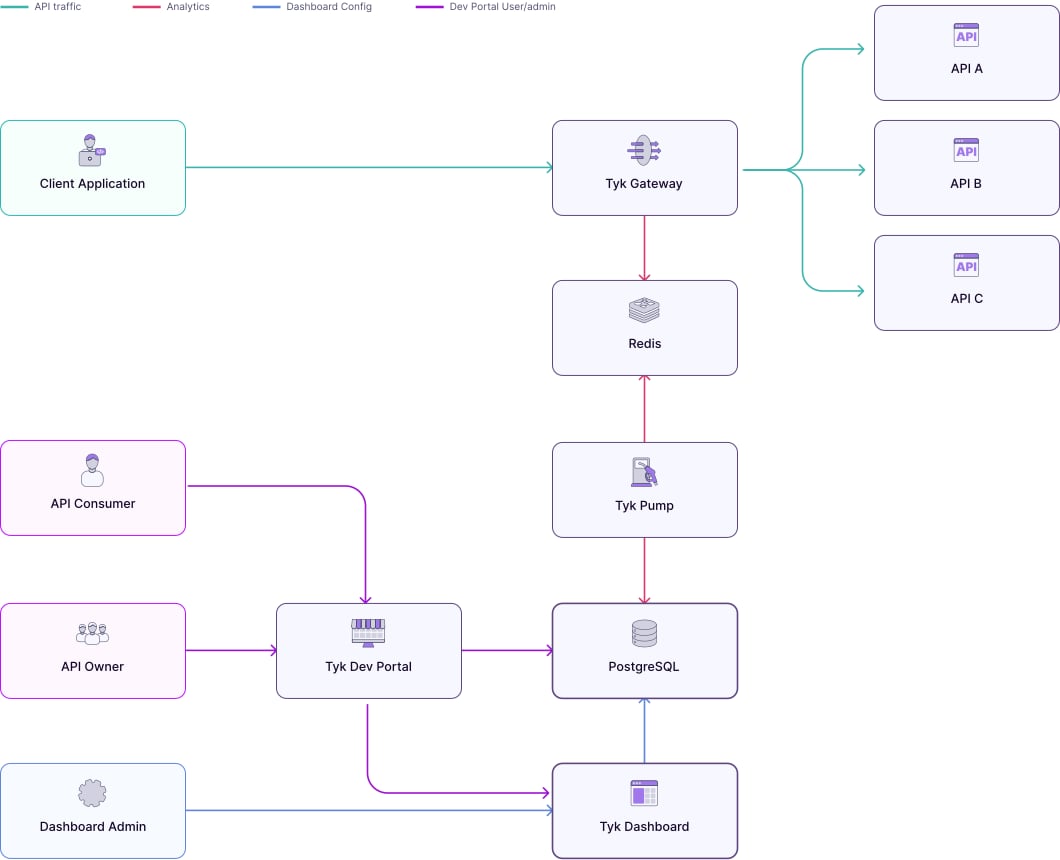
## Architecture
 ## Requirements
**Tyk Dashboard** requires a persistent datastore for its operations. By default MongoDB is used. From Tyk v4.0, we also support PostgreSQL.
### PostgreSQL
| Tyk Version | PostgreSQL Version |
| ---------------- | --------------------------- |
| From 5.X onwards | PSQL 14.x, 15.x, 16.x, 17.x |
You can also use the following as a drop in replacement for PostgreSQL:
* [Amazon RDS](https://aws.amazon.com/rds/)
* [Amazon Aurora PostgreSQL](https://docs.aws.amazon.com/AmazonRDS/latest/AuroraUserGuide/Aurora.AuroraPostgreSQL.html)
* [Azure CosmosDB for PostgreSQL](https://learn.microsoft.com/en-us/azure/cosmos-db/postgresql/introduction)
* [Sqlite](https://www.sqlite.org/index.html) (for development and testing only)
SQLite support will be deprecated from Tyk 5.7.0. To avoid disruption, please transition to PostgreSQL, MongoDB or one of the listed compatible alternatives.
Please check [here](/planning-for-production/database-settings#postgresql) for production configuration.
### MongoDB
| Tyk Version | MongoDB Version |
| ---------------- | --------------- |
| From 5.X onwards | MongoDB 7.0.x |
| From 5.9 onwards | MongoDB 8.0.x |
You can also use the following as a drop-in replacement for MongoDB:
* [Amazon DocumentDB](https://aws.amazon.com/documentdb/) 3.6 and 4 engine
* [Azure Cosmos DB for MongoDB](https://learn.microsoft.com/en-us/azure/cosmos-db/mongodb/introduction) 3.6 and 4 engine
Please check [here](/planning-for-production/database-settings#mongodb) for MongoDB driver and production configuration.
### Redis
**Tyk Gateway** requires Redis for its operations. Here is the list of supported versions:
| Tyk Version | Redis Version |
| -------------------- | ---------------------------------- |
| From 5.0.x to 5.8.x | 6.2.x, 7.x |
| From 5.9.x to 5.11.x | 6.2.x, 7.x, 7.4.x, 8.x (up to 8.2) |
| From 5.12.x onwards | 6.2.x, 7.x, 7.4.x, 8.x (up to 8.4) |
Visit the [Redis page](/planning-for-production/database-settings#redis) for more info.
## Recommended Installation: Docker
For development, testing, and proof of concept purposes, we recommend using our Docker installation, which allows you to quickly spin up a full Tyk stack on your local machine.
Install with Docker
## Alternative Installation Methods
Install on K8s
Install with Ansible
Install on Red Hat
Install on Ubuntu
Install on Amazon AWS
Install Tyk on Heroku
Install on Microsoft Azure
## Air Gapped Installation
For environments with restricted network access, we provide guidance on how to deploy Tyk using private container registries and local package mirrors.
Refer to our [Air-Gapped Deployment guide](/api-management/air-gapped-deployment) for detailed instructions on how to set up Tyk in air-gapped or network-restricted environments.
## Requirements
**Tyk Dashboard** requires a persistent datastore for its operations. By default MongoDB is used. From Tyk v4.0, we also support PostgreSQL.
### PostgreSQL
| Tyk Version | PostgreSQL Version |
| ---------------- | --------------------------- |
| From 5.X onwards | PSQL 14.x, 15.x, 16.x, 17.x |
You can also use the following as a drop in replacement for PostgreSQL:
* [Amazon RDS](https://aws.amazon.com/rds/)
* [Amazon Aurora PostgreSQL](https://docs.aws.amazon.com/AmazonRDS/latest/AuroraUserGuide/Aurora.AuroraPostgreSQL.html)
* [Azure CosmosDB for PostgreSQL](https://learn.microsoft.com/en-us/azure/cosmos-db/postgresql/introduction)
* [Sqlite](https://www.sqlite.org/index.html) (for development and testing only)
SQLite support will be deprecated from Tyk 5.7.0. To avoid disruption, please transition to PostgreSQL, MongoDB or one of the listed compatible alternatives.
Please check [here](/planning-for-production/database-settings#postgresql) for production configuration.
### MongoDB
| Tyk Version | MongoDB Version |
| ---------------- | --------------- |
| From 5.X onwards | MongoDB 7.0.x |
| From 5.9 onwards | MongoDB 8.0.x |
You can also use the following as a drop-in replacement for MongoDB:
* [Amazon DocumentDB](https://aws.amazon.com/documentdb/) 3.6 and 4 engine
* [Azure Cosmos DB for MongoDB](https://learn.microsoft.com/en-us/azure/cosmos-db/mongodb/introduction) 3.6 and 4 engine
Please check [here](/planning-for-production/database-settings#mongodb) for MongoDB driver and production configuration.
### Redis
**Tyk Gateway** requires Redis for its operations. Here is the list of supported versions:
| Tyk Version | Redis Version |
| -------------------- | ---------------------------------- |
| From 5.0.x to 5.8.x | 6.2.x, 7.x |
| From 5.9.x to 5.11.x | 6.2.x, 7.x, 7.4.x, 8.x (up to 8.2) |
| From 5.12.x onwards | 6.2.x, 7.x, 7.4.x, 8.x (up to 8.4) |
Visit the [Redis page](/planning-for-production/database-settings#redis) for more info.
## Recommended Installation: Docker
For development, testing, and proof of concept purposes, we recommend using our Docker installation, which allows you to quickly spin up a full Tyk stack on your local machine.
Install with Docker
## Alternative Installation Methods
Install on K8s
Install with Ansible
Install on Red Hat
Install on Ubuntu
Install on Amazon AWS
Install Tyk on Heroku
Install on Microsoft Azure
## Air Gapped Installation
For environments with restricted network access, we provide guidance on how to deploy Tyk using private container registries and local package mirrors.
Refer to our [Air-Gapped Deployment guide](/api-management/air-gapped-deployment) for detailed instructions on how to set up Tyk in air-gapped or network-restricted environments.